


OK, guys, I really need to get back to my blogging schedule. I know this. And it’s going to happen soon. This post, though isn’t that.
Right now, I have a bit of a housekeeping item I wanted to share, and it’s way too long and wordy to put in a newsletter.
I got some rather frustrated feedback from a subscriber after the last issue of Sara’s Scribbles saying the pre-order link for Between the Worlds was only going to Amazon, not also to Barnes & Noble. The thing is… that’s not really true. (In the newsletter, anyway. I did realize the link on the actual book page on the website is an Amazon-direct link, and I’ll be fixing that as soon as I post this. The pre-order really was Amazon only when I created that button. Ah, well.)
I use Universal Book Links almost everywhere I post a book for sale. A lot of heavy readers–especially readers of indie authors–are familiar with UBLs, but not all. And even if you’re used to seeing them, just clicking on a store to go buy a book is a lot less complicated than creating and managing UBLs on the backend.
The point is, I know what was likely happening to that reader, and it’s probably not just that one person–so I’m putting this out as a PSA for any readers sharing her frustration.
In case you’re not familiar, the way UBLs work is this: The author picks a platform to host the UBL. The most common one is Books2Read, but there are others. Most of mine (right now) are hosted through StoryOrigin. The author creates a page for their book on that site, then fills in links to every online retailer where a reader can find their book. On the back end, setting up a UBL looks something like this:
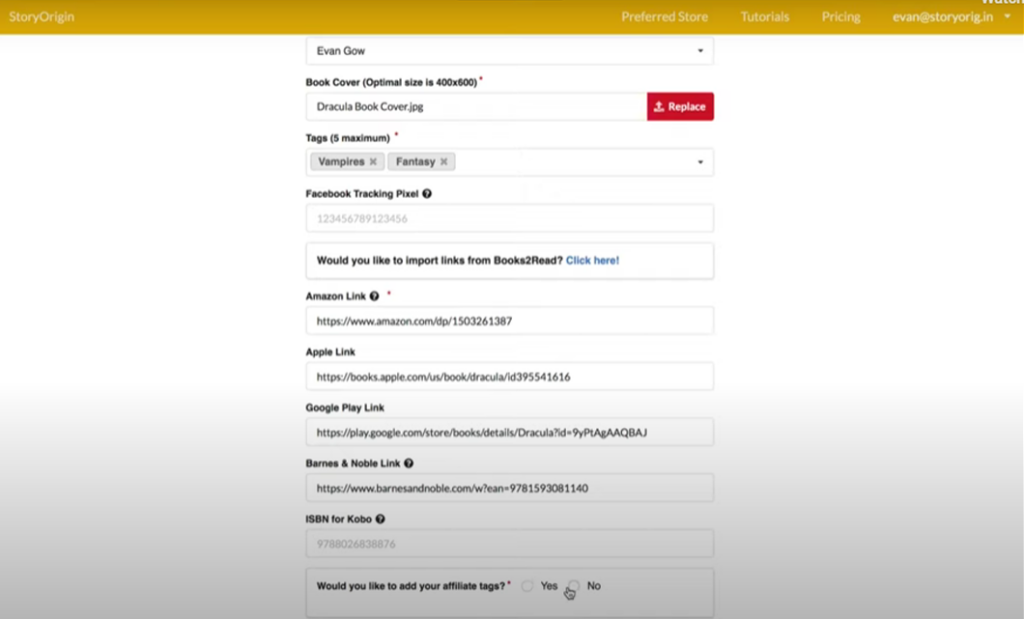
Once the link is set up and published, the author can share a single URL, the Universal Book Link, to share all their retail options at once. This means we have to share just one link but can give everyone the chance to buy the book where they prefer. And the best part is we can add, remove, or change retailer links on our side and the existing link continues to work, reflecting the updated information.
Here’s an example of a UBL from the user’s side–I’m sure you’ve seen a lot of them before!
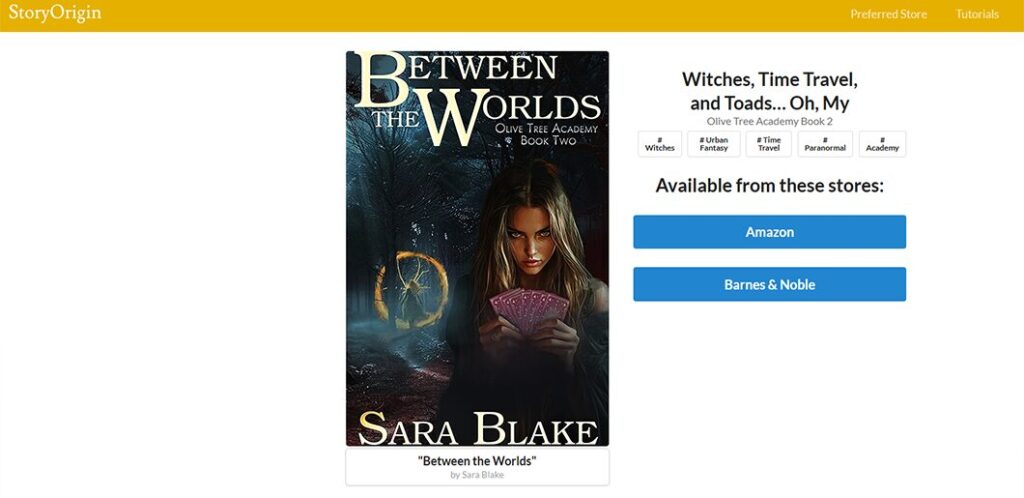
I haven’t been off Amazon exclusive for long, so I don’t have things set up at a ton of sites yet, so mine just have Amazon and Barnes & Noble for now, but I’m sure you’ve seen them with a lot of links to different sites.
Now, here’s the catch–watch what happens when I click on the Barnes & Noble link on that UBL:
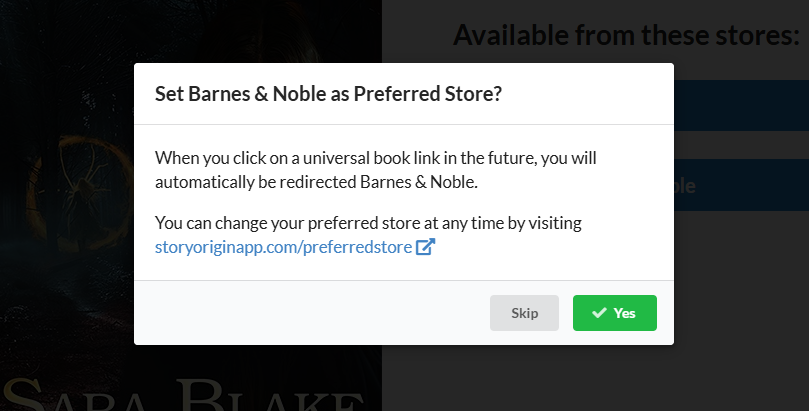
If I were to select “Yes” here, it would not only take me to the Barnes & Noble listing for this book, but it would stop giving me all the options. Next time I clicked a UBL from StoryOrigin–for any book by any author–it would automatically send me right to Barnes & Noble without asking.
That’s great if you have a single store you prefer using all the time. But what happens if you switch favorite stores?
If you’re clicking a book link that keeps sending you to a store you don’t want, the first step is to confirm it’s a UBL. Hover your cursor over it to see where it points. If it shows a site like StoryOrigin, BookFunnel, or Books2Read, that’s a UBL. When you click it, if you’re quick, you’ll see first the URL for the UBL load and then, if you’ve selected a preferred store, you’ll be immediately redirected there.
If that’s happening, and the store you’re landing on isn’t the one you want, you’ve almost certainly made a “Yes” choice when clicking a UBL at some point. Look at the first part of the UBL link to see which site it’s hosted at, then go directly to that site manually.
At StoryOrigin, there’s a “Preferred Store” link on the banner that runs across every page. (You can see it in the screenshot of my Between the Worlds UBL.) Click on that, and you’ll have the option to change your preferred store or set it to None.
I can’t find a good link on the Books2Read site, but the URL to follow is: books2read.com/links/preferences. Once you’re there, the option is pretty much the same, select a store or choose “no preferred store”
I experimented with a BookFunnel UBL and I don’t think they give the option to set a preferred store, so you shouldn’t have that problem with their links. I’m sure there are lots of other possible UBL providers, but the general idea is the same. If you’re getting redirected and don’t want to be, go to the site and poke around–there’ll be a way to undo it.
OK, that’s enough rambling from me. I just didn’t want anybody else having the frustration of expecting a UBL and instead winding up at a single store over and over. Ironically, that reader feedback came while I was dealing with this issue on my own UBLs. I’d selected Amazon as my preferred store for StoryOrigin but have since changed my mind. I knew what was happening, but hadn’t gotten around to figuring out how to fix it. So I helped myself with this, too!
Thanks for stopping by–I swear I’ll get back to actually intersting posts very, very soon!